Artificial intelligence has changed what it means to create visual art. A few years ago producing a polished digital illustration meant years of practice expensive software, or hiring a designer. Today a growing number of platforms let anyone type a sentence and watch a finished image appear seconds later. OpenDream AI art is one of the tools leading this shift positioning itself as a simple accessible entry point into AI generated visuals for hobbyists, content creators and small businesses alike.
This article breaks down exactly what OpenDream is how the technology behind it works, what it costs how it compares to bigger names like Midjourney and DALL-E and whether it deserves a spot in your creative toolkit. Whether you found this page because you are curious about the tool, comparing options before signing up or trying to understand why OpenDream keeps showing up in AI art discussions you will find a clear and practical answer below.
Table of Contents
What Is OpenDream AI Art
OpenDream is a browser based text to image generator that converts written prompts into digital artwork using diffusion based AI models. Instead of opening design software or sketching by hand a user simply types a description of what they want to see selects a style or model and the platform generates a matching image within seconds. No downloads no installation and no local graphics hardware are required since all of the processing happens on OpenDream’s servers.
The platform is built around accessibility. It targets people who may have no design background at all alongside more experienced creators who want a fast way to prototype visual ideas. OpenDream offers a free tier with no credit card required which has made it a popular starting point for people who are testing AI art generation for the first time before committing to a paid subscription elsewhere.
Beyond plain text to image generation OpenDream includes template libraries organized by use case such as social media graphics, character art, logos, and product mockups. These templates give users a starting structure they can adjust rather than requiring them to write a detailed prompt entirely from scratch, which lowers the learning curve significantly for first-time users.
How OpenDream AI Art Actually Works
OpenDream relies on diffusion models a type of machine learning architecture that has become the industry standard for AI image generation. In simple terms, a diffusion model starts with a field of random visual noise and gradually refines it, step by step into a coherent image that matches the text prompt it was given. This is the same underlying approach used by many popular AI art tools including systems built on open source Stable Diffusion technology.
The platform gives users a choice of different models each trained or fine-tuned for a different visual style. One model is optimized for photorealistic output useful for portraits, landscapes and product style images. Another is tuned specifically for anime and manga style artwork which has become a significant draw for OpenDream given how large the anime art community is online. Additional models lean toward more experimental, painterly, or abstract results, giving users flexibility depending on the mood or aesthetic they are going for.
Once a prompt is submitted the selected model processes the text and generates one or more image variations. Free users typically generate one image at a time while paid subscribers can generate multiple images in parallel which speeds up the process of exploring different directions for the same idea. The entire generation cycle usually completes within seconds, making it realistic to iterate on a concept many times in a single sitting without the workflow feeling slow or frustrating.
OpenDream Pricing and Free Plan Explained
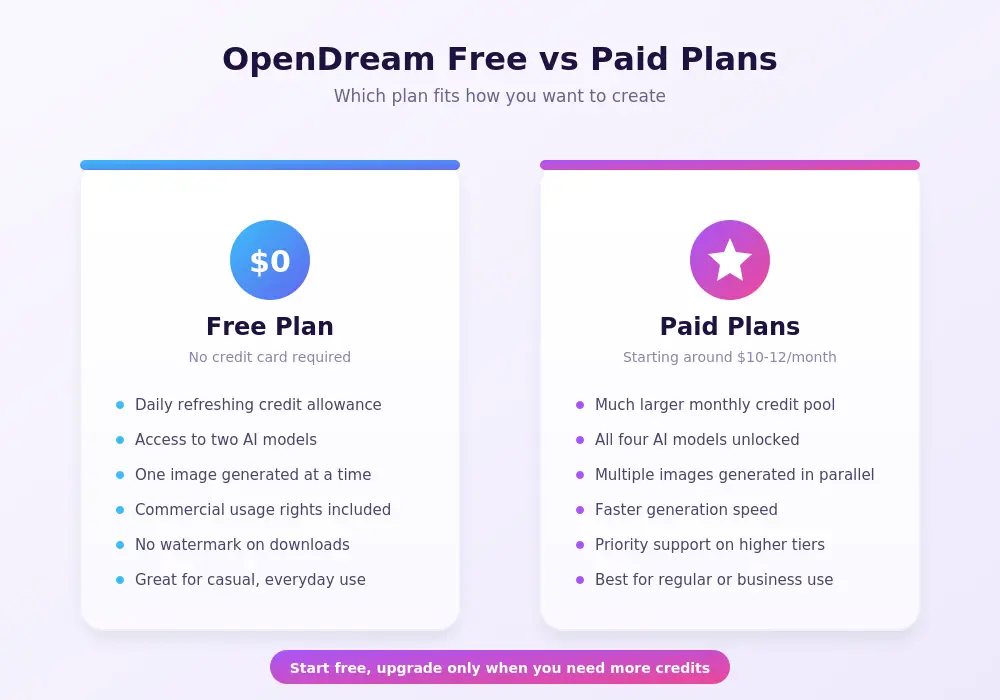
Understanding the cost structure matters before committing time to any AI art platform and OpenDream uses a credit based freemium model. The free plan gives new users a set number of credits that refresh daily along with access to two of the platform’s AI models. This is enough for casual experimentation occasional social media graphics, or simply testing whether AI art generation fits your workflow before paying for anything.
Paid plans unlock significantly more value. The mid tier pla priced at roughly ten to twelve dollars per month depending on current promotions, expands the monthly credit allowance substantially and unlocks all available models including the more experimental and anime-focused options that remain locked on the free tier. A higher-tier plan exists for users who need heavier usage, offering an even larger credit pool along with priority support and faster, more parallel image generation, which matters for creators producing content at volume.
One detail worth highlighting is that OpenDream includes commercial usage rights and watermark-free downloads across all of its plans including the free tier. This is not universal across the AI art generator market where some platforms restrict commercial use to paid subscriptions only or add visible watermarks to free tier output. For freelancers, small business owners or content creators who need usable assets without extra licensing complications this is a meaningful advantage worth factoring into any comparison. Because exact pricing and credit allowances can shift over time as platforms adjust their plans it is always worth checking the official OpenDream pricing page for the most current numbers before subscribing.
Getting Started With OpenDream Step by Step
Signing up for OpenDream takes only a couple of minutes and the platform is designed so that a first time user can generate an image without needing to read a manual first. After creating a free account which does not require a credit card, users are immediately given their daily credit allowance and can start generating right away.
The first real decision is whether to start from a blank prompt or from one of the pre built templates. For someone unfamiliar with prompt writing templates offer a faster and less intimidating entry point since they provide a structured starting phrase that can simply be edited rather than written from scratch. More experienced users often prefer writing prompts directly since it gives full control over subject style lighting and composition.
After choosing a starting point, the next step is selecting which AI model to use based on the desired aesthetic. A user aiming for a realistic portrait would choose the photoreal focused model while someone creating anime style character art would select the model built specifically for that purpose. Writing an effective prompt typically involves describing the subject clearly, then layering in details about style, lighting, mood, and composition. A prompt like “a fox standing in a neon-lit city street at night, photorealistic, cinematic lighting” gives the model far more to work with than a vague one-line description, and generally produces a noticeably stronger result.
Advanced Prompt Techniques for Better Results
Getting consistently strong output from any AI art generator, including OpenDream, comes down to how well the prompt communicates intent. A common mistake among beginners is writing prompts that are too short or too vague, which forces the model to fill in gaps with generic assumptions. Adding specific descriptive layers such as camera angle lighting style color palette and artistic influence tends to produce results that feel more intentional and polished.
Another technique worth learning is using a fixed seed value. A seed is essentially the starting point of randomness that the diffusion process uses to generate an image. Keeping the seed constant while changing small parts of the prompt allows a user to explore variations of the same underlying composition which is especially useful for concept artists who want to test different styles or color treatments without losing the core layout they have already found appealing.
In-painting, where available is another valuable technique for refining a nearly finished image rather than regenerating it from scratch. If a generated image is almost right except for one problematic element using in painting to target and fix that specific area saves both time and generation credits compared to starting over completely. For anyone producing a high volume of images mastering these smaller techniques adds up to a meaningfully more efficient workflow over time.
OpenDream AI Art Reviews and User Feedback
Reviews of OpenDream across independent AI tool directories and comparison sites consistently point to the same core strengths: accessibility ease of use and a genuinely useful free tier. Reviewers frequently highlight that the platform requires no technical background to get started which makes it a common recommendation for people who are AI art curious but intimidated by more complex tools.
The anime and character generation features receive particular praise, with several reviews noting that OpenDream’s dedicated anime focused model produces noticeably stronger results in that specific style compared to general purpose competitors. This has helped the platform build a loyal following within anime and character-art communities specifically rather than only competing broadly across every art style at once.
On the critical side reviewers are fairly consistent in noting that OpenDream is not positioned to compete with premium professional grade tools like Midjourney when it comes to the most polished gallery quality artistic output. Power users and professional concept artists may find the free and mid tier models limiting compared to what dedicated professional tools can achieve. The general consensus across reviews is that OpenDream is best suited for beginners hobbyists and creators who need fast functional commercially usable images rather than the absolute highest level of artistic polish.
OpenDream vs Midjourney vs Other AI Art Tools
Choosing between AI art platforms usually comes down to what you actually need the output for, and OpenDream occupies a distinct middle ground in this comparison. Midjourney is widely regarded as producing more visually striking and artistically refined results, particularly for complex scenes and stylized concept art but it comes with a steeper learning curve and a pricing structure that assumes more serious, ongoing use.
Stable Diffusion when run through its more technical open source interfaces offers the deepest level of customization of any option in this comparison since users can fine tune models adjust technical parameters directly and even train custom models on their own datasets. That depth comes at the cost of accessibility since it typically requires more technical setup and comfort with configuration that casual users are unlikely to want to deal with. OpenDream by contrast trades some of that deep customization for a browser based no setup experience that gets a usable image in front of a beginner within minutes.
For content creators and small businesses specifically, OpenDream’s inclusion of commercial rights on every plan, including the free tier, is a genuine differentiator worth weighing carefully. Several competing platforms restrict commercial usage to paid subscribers only, which can catch new users off guard if they start generating marketing assets on a free plan without realizing a license issue exists. This makes OpenDream a reasonable starting point for freelancers or small business owners who want to experiment with AI generated marketing visuals without committing to a paid plan first.
Why Is OpenDream AI Art Trending
Interest in OpenDream has grown alongside the broader explosion of AI image generation tools entering the mainstream. As more creators marketers and small businesses look for faster cheaper ways to produce visual content tools that lower the barrier to entry naturally attract more search interest and word of mouth attention. OpenDream’s zero cost no credit card entry point makes it an easy tool for people to try on a whim, which drives a steady stream of new users discovering the platform through recommendations comparison articles and social media.
The anime and character art angle has also played a meaningful role in the platform’s visibility. Anime art communities are large active and highly engaged online, and a tool that produces noticeably strong results in that specific style tends to spread quickly through word of mouth within those communities. This niche strength has helped OpenDream carve out a recognizable identity in a market that is otherwise crowded with dozens of broadly similar text to image tools competing for the same general audience.
Finally, as AI-generated content becomes more normalized across social media marketing and small business branding more people are actively searching for accessible entry points into AI art creation rather than jumping straight into more complex professional tools. OpenDream’s positioning as a simple free commercially friendly option places it directly in the path of that growing search intent which explains much of its sustained visibility in AI art discussions throughout 2026.
Latest Update on OpenDream Features
OpenDream has continued expanding its model lineup and template library as competition in the AI art space has intensified. Current offerings include multiple distinct models covering photorealistic imagery, anime-style art, general creative diffusion output, and more experimental, painterly styles, giving users meaningfully different aesthetic options depending on their project rather than a single one-size-fits-all engine.
The platform has also leaned further into template-driven workflows, expanding its library across use cases like social media graphics, banners, product mockups, and concept art starting points. This shift reflects a broader trend across the AI art generator market, where platforms are increasingly trying to serve practical, output-focused use cases like marketing content and social posts, not just artistic experimentation for its own sake.
Commercial licensing has remained a consistent selling point through recent updates, with watermark-free, commercially usable output continuing across all plan tiers including free accounts. As the AI art tool market matures and competitors adjust their own licensing terms, this consistency has become one of OpenDream’s more dependable differentiators, and it is worth confirming directly on the official site if commercial use is central to your intended workflow, since terms across this fast-moving industry can and do change.
Who Should Use OpenDream AI Art
OpenDream fits a fairly specific but sizable audience well. Beginners who have never tried AI art generation before will likely find it one of the friendliest entry points available, thanks to its no-cost signup, lack of technical setup, and template-driven approach that removes much of the intimidation factor associated with writing prompts from scratch. Hobbyists who want to experiment casually without financial commitment also fit naturally into the free tier’s daily credit structure.
Content creators and small business owners represent another strong fit, particularly those who need quick visual assets for social media, blog graphics, or simple marketing materials and want commercial usage rights included without extra cost or complexity. Anime and character art enthusiasts specifically tend to get outsized value from the platform given its dedicated, well-regarded model for that style.
On the other hand, professional concept artists, agencies producing polished client-facing campaign visuals, or anyone who needs the absolute highest level of artistic refinement may find OpenDream’s output falls short of more premium, artistically ambitious tools. For that audience, OpenDream can still serve as a fast prototyping tool for early concept exploration, even if final production work ends up happening in a more advanced platform afterward.
Frequently Asked Questions
What is OpenDream AI art?
OpenDream AI art refers to images generated using the OpenDream platform, a browser-based text-to-image tool that uses diffusion machine learning models to turn written prompts into digital artwork.
Is OpenDream AI art free to use?
Yes, OpenDream offers a free plan with a daily credit allowance and access to a limited selection of AI models, and it does not require a credit card to sign up. Paid plans expand the credit limit and unlock additional models.
Can I use OpenDream images for commercial purposes?
Yes, OpenDream includes commercial usage rights and watermark-free downloads across all of its plans, including the free tier, though it is worth confirming current terms directly on the official site since licensing details can change over time.
How does OpenDream compare to Midjourney?
Midjourney generally produces more artistically polished and visually striking results, especially for complex scenes, but it has a steeper learning curve. OpenDream prioritizes accessibility and ease of use, making it a better starting point for beginners.
Does OpenDream require any design skills?
No, OpenDream is built specifically for users without a design or art background. Its template library and simple prompt-based interface allow anyone to generate images without prior experience.
What kind of images can OpenDream generate?
OpenDream can generate a wide range of image types, including photorealistic visuals, anime and character art, logos, icons, concept art, and more experimental or abstract styles, depending on which model is selected.
Is OpenDream better for anime art than other AI tools?
Reviewers frequently note that OpenDream’s dedicated anime-focused model produces particularly strong results in that specific style, making it a popular choice within anime and character-art communities specifically.
Does OpenDream work on mobile devices?
Yes, OpenDream runs entirely in the browser and works on both desktop and mobile without requiring any app installation, since all image processing happens on OpenDream’s servers rather than the user’s device.
Conclusion
OpenDream AI art has carved out a clear identity in a crowded market by prioritizing accessibility over artistic maximalism. It is not trying to be the most advanced or artistically ambitious tool available, and reviewers are consistent in noting that more premium platforms like Midjourney still lead when it comes to polished, professional-grade output. What OpenDream does offer is a genuinely easy, free, and commercially usable entry point into AI art generation, with a standout strength in anime and character art that has helped it build a loyal community following. For beginners, hobbyists, content creators, and small businesses who want fast, functional visuals without a steep learning curve or upfront cost, OpenDream is a solid, low-risk place to start experimenting with AI-generated art.
You Might Also Like
If you enjoyed this guide, here are a couple of other reads worth checking out:
- AI Study Tools That Are Better Than ChatGPT — a closer look at AI-powered study tools that outperform ChatGPT for learning, research, and productivity.
- Random QR Code: What It Is and How to Generate One Free — everything you need to know about random QR codes, scanning safety, and generating your own for free.